Documentation / Getting started
Getting started: your first 10 minutes
Sync2Sys takes products from your supplier (a price list by link, a file or FTP), adds your markup and pushes them to your store. Getting the first products into your store takes four steps.
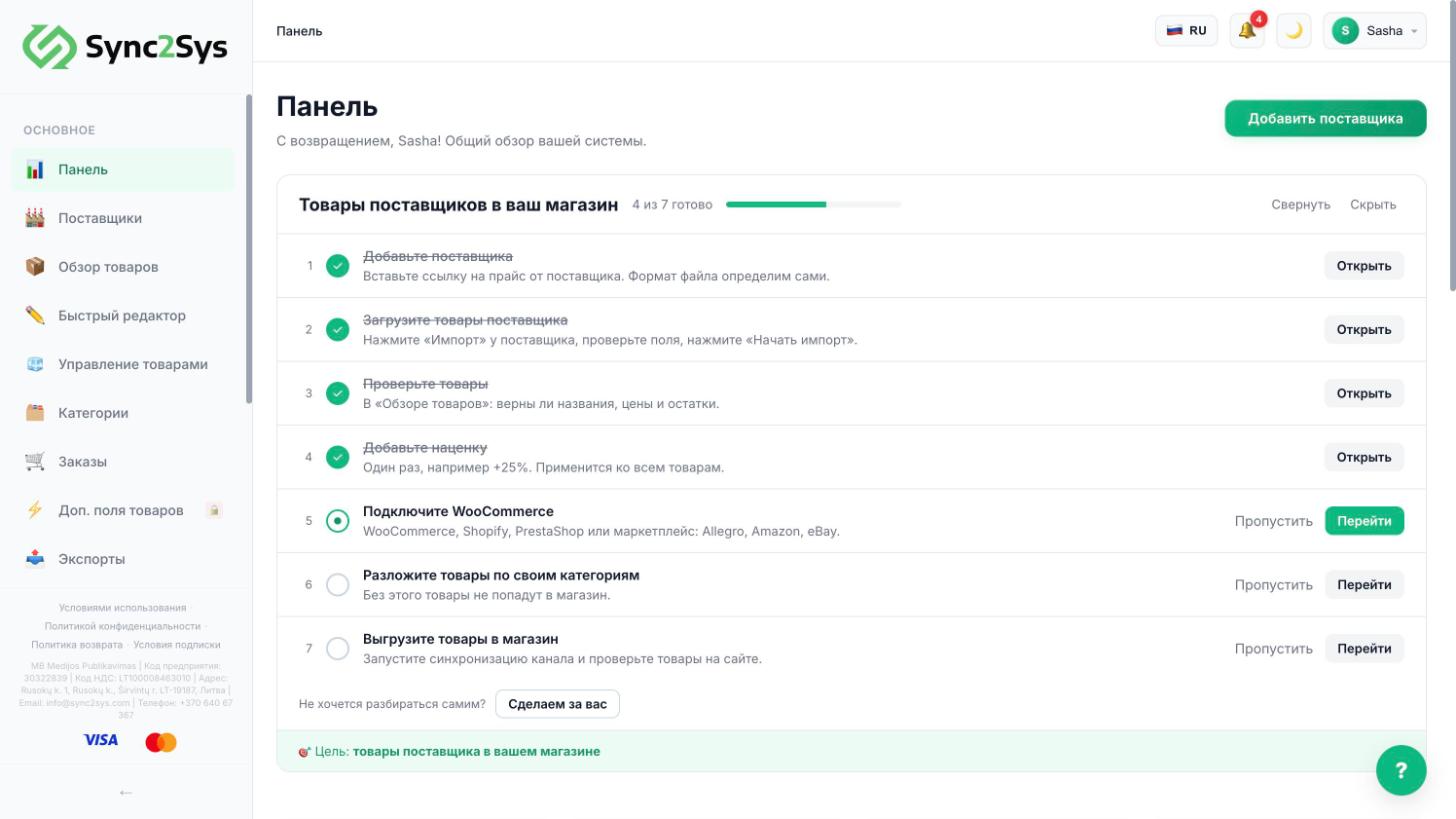
- Add a supplier: "Suppliers" → "Add supplier", then paste the link to the price list. No link of your own? The "Suppliers" page has a sample with 46 products.
- Load the products: in the supplier row, press "Import", check that Name, Price and Stock are mapped, then press "Start import".
- Check the products in "Product Overview" and set your markup: "Pricing Rules" → "New rule".
- Connect your store in "Sales Channels" and run the channel sync. The products will appear on your site.
TipThe setup guide on the "Dashboard" ticks off steps by itself as soon as you complete them.
TipThe "?" button in the bottom right: tips for the current page, articles and a chat with our team.
See also
How to add a supplier by linkHow to load supplier productsHow to set a markupHow to connect WooCommerce
Did not find the answer?In the panel press ? at the bottom right and write in the chat. We reply within one business day, and can set things up for you.