Documentation / Importing products
How to load supplier products
Import brings products from the price list into Sync2Sys. Before loading, the system shows which price list field goes where and maps most fields by itself.
- "Suppliers" → press "Import" in the supplier row (or "Product Overview" → "Import" and choose the supplier).
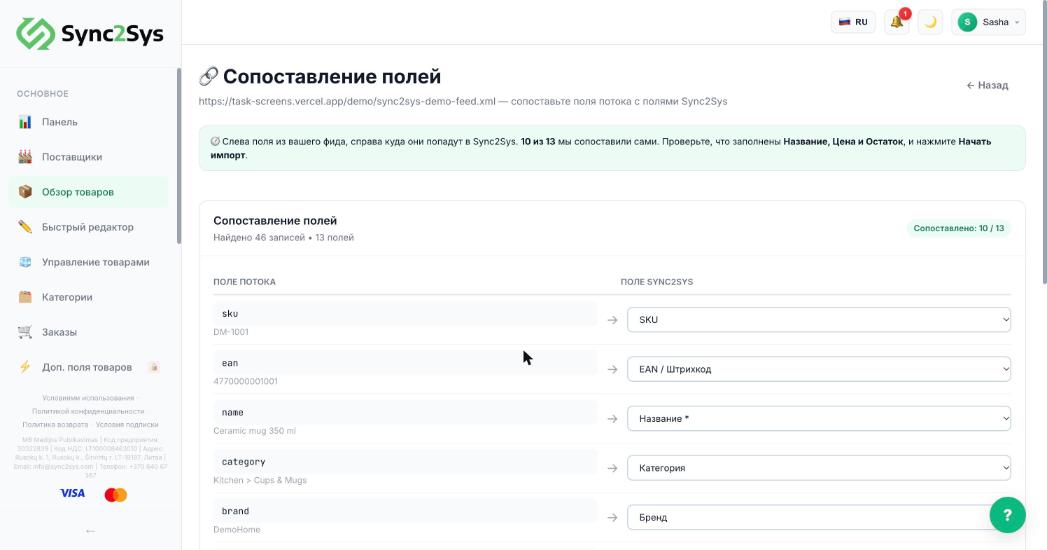
- On the mapping screen, the price list fields with a sample value are on the left, Sync2Sys fields are on the right.
- Check the three required ones: Name, Supplier price, Stock quantity. If one is set to "Skip", pick the right field from the list.
- Press "Start import" at the bottom. In a few seconds you will see the result: how many products were created, updated and skipped.
- Press "View products" to check the result.
TipImport sends nothing to your store: the products only appear in Sync2Sys.
TipOn the Sandbox plan, up to 100 products are loaded. The rest wait until you upgrade.
If it does not workThe price did not load: go back to the import and check that the "price" field is mapped to "Supplier price", not to the currency.
See also
Which fields are required for importWhat to do if a field was not detectedHow "Import" differs from "Sync all"
Did not find the answer?In the panel press ? at the bottom right and write in the chat. We reply within one business day, and can set things up for you.